What Happen to Yahoo Answers ?
They Rolled out a new Format it sucks Yahoo does not tell us anything anymore on when
they change it or Why they are changing it
How to Access Category's under the new Format
Click on Answers Home then click on any Category then click on All Category's on the
Top thats the only way to Access it For now Hopefully Yahoo will Fix it and Provide a
Better way to get to the Category's
Is there anyway Back to the Old Yahoo Answers ?
No there is no way to go back to the Old Yahoo Answers
What Happened to the Pin Category's
Looks Like it is Discontinued Although the Pins are Still there when you click on it
On the top of the Category's nothing Happens
How Do I get to my Asked and Answered Questions ?
Thankfully that is still Mostly the same just instead of going to the Left you go to the
Right and click on your name and on the next page it will show you your Asked and
Answered Questions
Do you think there will be changes made to the new Format that was Released
I Think its possible but I highly Doubt anytime soon tho hopefully they will wake up and Realize that there not making it easy for people to find things if they dont do something soon about it its Possible a lot of people may not be able to put up with the changes and they may leave the site
Sunday, November 26, 2017
Saturday, May 6, 2017
Why Trains sometimes take there Service offline for Track work and replace with Bus
Why do Trains sometimes Take there Service Offline and Replace with Buses
Many of you guys Take the Trains and Sometimes on the Weekends you may Notice
That they shut down the Trains and Replaced them with Buses some people may know
why but other people may not know why they have to do that so Im here to Explain
Just like Cars need Maintenance to keep the Car running Smoothly and Safely Trains
work the same way and just like Cars you have to get out of the Car and have it
on Shut down mode to work on it Same way with Trains
For Instance
Crossing Gates need to be Worked on and checked Every now and then to make sure
they Continue to run Properly if they dont run Properly then that can be
Dangerous for you and other Passengers that are on your Train a lot of Accidents
have happen not Necessary from the Crossing gates but people have drove there
Cars onto the Tracks when the Crossing Gates are going down
Danbury Line and the New Cannan Line and Waterbury line are the most Popular ones
that they Shut down the Trains to do Track work on
MetroNorth does not want to leave you guys tho with nothing so they provide you with Buses instead of the Trains while they do this they do it at no Additional charges so the Costs are the same as it would be for a Train Ticket and the Ticket App is Honored on the Buses
Many of you guys Take the Trains and Sometimes on the Weekends you may Notice
That they shut down the Trains and Replaced them with Buses some people may know
why but other people may not know why they have to do that so Im here to Explain
Just like Cars need Maintenance to keep the Car running Smoothly and Safely Trains
work the same way and just like Cars you have to get out of the Car and have it
on Shut down mode to work on it Same way with Trains
For Instance
Crossing Gates need to be Worked on and checked Every now and then to make sure
they Continue to run Properly if they dont run Properly then that can be
Dangerous for you and other Passengers that are on your Train a lot of Accidents
have happen not Necessary from the Crossing gates but people have drove there
Cars onto the Tracks when the Crossing Gates are going down
Danbury Line and the New Cannan Line and Waterbury line are the most Popular ones
that they Shut down the Trains to do Track work on
MetroNorth does not want to leave you guys tho with nothing so they provide you with Buses instead of the Trains while they do this they do it at no Additional charges so the Costs are the same as it would be for a Train Ticket and the Ticket App is Honored on the Buses

Friday, April 14, 2017
How to Clear your Cookies Cache and Delete your Temporary Files the Proper way
These Steps will Vary Depending on what Browser you are using
Clear Browser Cache Tutorial
This tutorial is universal for most web browsers.
- Step 1 -
Windows
Press "Ctrl + Shift + Delete" keys, together.
Safari users should press "Ctrl + Alt + E"
Mac
Chrome users should press "Shift + Command + Delete"
- Step 2 -
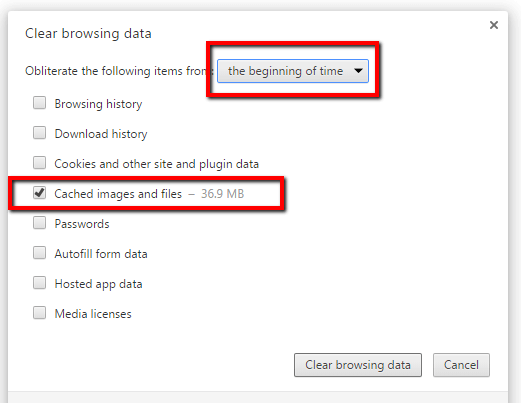
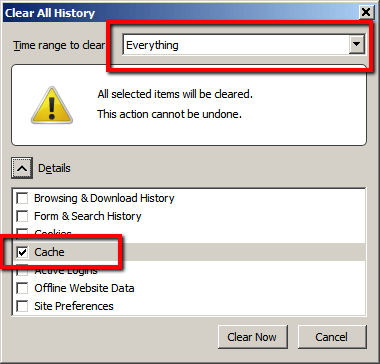
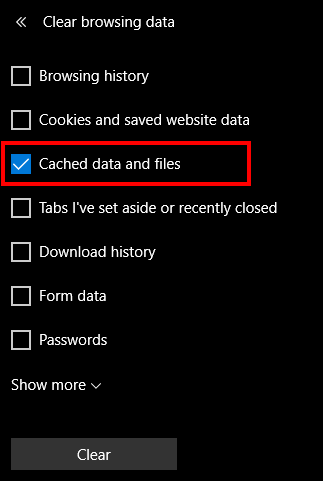
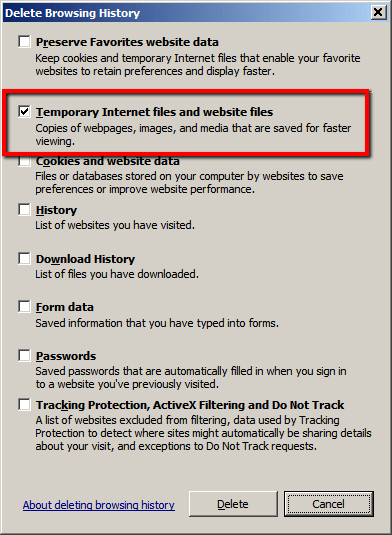
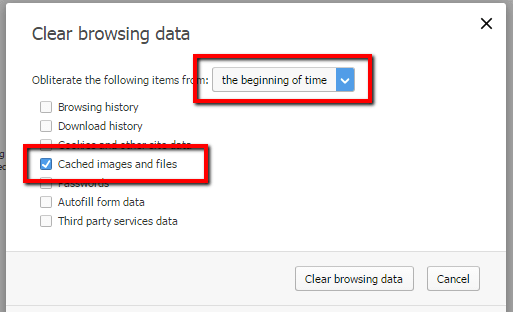
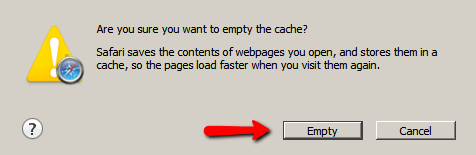
A pop up window will emerge on your screen after pressing those keys.
Find your browser image below.
Only use the settings displayed in the example image.
Click the "Clear" button.
Chrome
Firefox
Edge
Internet Explorer
Opera
Safari
- Step 3 -
Restart your browser
Clearing your Cookies and Cache and Deleting your Temporary Files can solve some of the Website Issues that people have if its on your End of course if clearing these things does not work then its Likely a Problem with the Website it self
(Credit for these Images is Given to LYTS.Me they provided the Images and are not mine)
Clear Browser Cache Tutorial
This tutorial is universal for most web browsers.
- Step 1 -
Windows
Press "Ctrl + Shift + Delete" keys, together.
Safari users should press "Ctrl + Alt + E"
Mac
Chrome users should press "Shift + Command + Delete"
- Step 2 -
A pop up window will emerge on your screen after pressing those keys.
Find your browser image below.
Only use the settings displayed in the example image.
Click the "Clear" button.
Chrome
Firefox
Edge
Internet Explorer
Opera
Safari
- Step 3 -
Restart your browser
Clearing your Cookies and Cache and Deleting your Temporary Files can solve some of the Website Issues that people have if its on your End of course if clearing these things does not work then its Likely a Problem with the Website it self
(Credit for these Images is Given to LYTS.Me they provided the Images and are not mine)
Saturday, April 8, 2017
MetroNorth how to Scan your Tickets using the Bar code
MetroNorth will soon have your tickets scanned how to display the Bar Code
Very Important that you learn how to do this
As over the upcoming days MetroNorth will be changing the Protocol on Train
Tickets
In the past you would just Activate the Ticket and then show the Train Conductors
the Ticket
Now thats still gonna be the same only they will have to scan it with a bar code
That is not visible on the body of your Ticket but the bar code is there
At the top of the Ticket App you will see something that says Pull down to see
Bar code
Where it says that Pull it down and a Bar Code should come up
From there the Train Conductors Will be Scanning it
Does this take Effect on all the MetroNorth Routes ?
Right now its only going into Effect on the Hudson Routes but they are only
Testing it tho so if it goes well they will probably roll it out to all of the
Routes or if something goes wrong they may not we will see in the Future but
Even if this does not Effect you yet its still Important to learn how to do it
Should it come on all of the MetroNorth Routes
Will the Expiring Rules be the same ?
Yes Tickets will still Expire so Dont Activate your Ticket until you are boarding
the Train this way you have the Maximum amount of time to show the Train Captain
your Ticket if you Activate it prior to that you Risk the Ticket getting shut off
and if that Happens you will have to buy a Another Ticket
the only thing thats changing is the Tickets will be Scanned and Probably once
they are Scanned they will Expire faster
Very Important that you learn how to do this
As over the upcoming days MetroNorth will be changing the Protocol on Train
Tickets
In the past you would just Activate the Ticket and then show the Train Conductors
the Ticket
Now thats still gonna be the same only they will have to scan it with a bar code
That is not visible on the body of your Ticket but the bar code is there
At the top of the Ticket App you will see something that says Pull down to see
Bar code
Where it says that Pull it down and a Bar Code should come up
From there the Train Conductors Will be Scanning it
Does this take Effect on all the MetroNorth Routes ?
Right now its only going into Effect on the Hudson Routes but they are only
Testing it tho so if it goes well they will probably roll it out to all of the
Routes or if something goes wrong they may not we will see in the Future but
Even if this does not Effect you yet its still Important to learn how to do it
Should it come on all of the MetroNorth Routes
Will the Expiring Rules be the same ?
Yes Tickets will still Expire so Dont Activate your Ticket until you are boarding
the Train this way you have the Maximum amount of time to show the Train Captain
your Ticket if you Activate it prior to that you Risk the Ticket getting shut off
and if that Happens you will have to buy a Another Ticket
the only thing thats changing is the Tickets will be Scanned and Probably once
they are Scanned they will Expire faster
Friday, January 13, 2017
MTA E Tix
MTA E Tix How To Use The App
MetroNorth now allows you to buy Tickets on your Phone but you dont know how to use
it thankfully I have done it plenty of times and I will show you how to do it its
pretty simple Actually
First Step is to download the app
If you have a Iphone go to the Apple Itunes store and type in MTA E Tix and then
when it comes up hit Install
If you have a Android go to the Google Play store and type in MTA E Tix then when
It comes up hit Install
The ticket app works the same way as the Ticket Machine so when you go to the App
Select the Station that your going to then select your Destination
then to pay select the Debit Card option and put your CC Number info in and your
Security code then hit submit and your Ticket as long as it goes through your CC
ok it should say Submitted If you dont want to Enter your Card everytime I recommend
Registering for a MTA E Tix Account you have the option of doing that
How To Activate the Ticket ?
When it comes to going on your Train Activate your Ticket just before Boarding so
right as the Train comes go to the MTA E Tix App go to your Ticket Wallett Select
your Ticket hit Activate Ticket a Confirmation Message will pop up asking are you
sure hit Activate and it will be Activated
Do NOT Activate your Ticket Until its time for Boarding Reason being is Tickets have
a Timer on it most Tickets will only be Activated for about an Hour or so or what
ever the Predetermined Length is and it will Vary based on how many Stops you have
to your Destination If you Activate it before its time you risk the Ticket expiring
if that happens you will have to Re Purchase your Ticket again
Learn more about MTA E Tix
How to Scan your Ticket with the Barcode very Important please read
MetroNorth now allows you to buy Tickets on your Phone but you dont know how to use
it thankfully I have done it plenty of times and I will show you how to do it its
pretty simple Actually
First Step is to download the app
If you have a Iphone go to the Apple Itunes store and type in MTA E Tix and then
when it comes up hit Install
If you have a Android go to the Google Play store and type in MTA E Tix then when
It comes up hit Install
The ticket app works the same way as the Ticket Machine so when you go to the App
Select the Station that your going to then select your Destination
then to pay select the Debit Card option and put your CC Number info in and your
Security code then hit submit and your Ticket as long as it goes through your CC
ok it should say Submitted If you dont want to Enter your Card everytime I recommend
Registering for a MTA E Tix Account you have the option of doing that
How To Activate the Ticket ?
When it comes to going on your Train Activate your Ticket just before Boarding so
right as the Train comes go to the MTA E Tix App go to your Ticket Wallett Select
your Ticket hit Activate Ticket a Confirmation Message will pop up asking are you
sure hit Activate and it will be Activated
Do NOT Activate your Ticket Until its time for Boarding Reason being is Tickets have
a Timer on it most Tickets will only be Activated for about an Hour or so or what
ever the Predetermined Length is and it will Vary based on how many Stops you have
to your Destination If you Activate it before its time you risk the Ticket expiring
if that happens you will have to Re Purchase your Ticket again
Learn more about MTA E Tix
How to Scan your Ticket with the Barcode very Important please read
Saturday, November 19, 2016
How to add Windows 7 start menu to your Windows 10 computer
How to Install the old Windows 7 start menu to your Windows 10 computer
Do you hate the new Windows 10 menu and you just cant get use to the new start
Menu and want the old one back well a way was just created to get the old Start
Menu back from Windows 7 with Classic Shell
im going to show you how to Install it
before I show you want to tell you what is Classic Shell
Classic Shell is free software that improves your productivity, enhances the usability of Windows and empowers you to use the computer the way you like it. The main features are:
Highly customizable start menu with multiple styles and skins
Quick access to recent, frequently-used, or pinned programs
Find programs, settings, files and documents
Start button for Windows 7, Windows 8, Windows 8.1 and Windows 10
Toolbar and status bar for Windows Explorer
Caption and status bar for Internet Explorer
Classic Shell has been in active development for 6 years and has tens of millions of downloads.
The latest stable version of Classic Shell is 4.3.0
Its pretty cool if you think about it
now that you know what it is to install it go here
Click on Download now
Once you click on Download now it will install onto your Computer
When its done click on Classic shell open it up
It will ask you what menu would you like to use for the start menu select
the one you want should be Windows 7 click on that and apply it
Once you have done that you should now have a Windows 7 start menu on your
Windows 10 computer
Do you hate the new Windows 10 menu and you just cant get use to the new start
Menu and want the old one back well a way was just created to get the old Start
Menu back from Windows 7 with Classic Shell
im going to show you how to Install it
before I show you want to tell you what is Classic Shell
Classic Shell is free software that improves your productivity, enhances the usability of Windows and empowers you to use the computer the way you like it. The main features are:
Highly customizable start menu with multiple styles and skins
Quick access to recent, frequently-used, or pinned programs
Find programs, settings, files and documents
Start button for Windows 7, Windows 8, Windows 8.1 and Windows 10
Toolbar and status bar for Windows Explorer
Caption and status bar for Internet Explorer
Classic Shell has been in active development for 6 years and has tens of millions of downloads.
The latest stable version of Classic Shell is 4.3.0
Its pretty cool if you think about it
now that you know what it is to install it go here
Click on Download now
Once you click on Download now it will install onto your Computer
When its done click on Classic shell open it up
It will ask you what menu would you like to use for the start menu select
the one you want should be Windows 7 click on that and apply it
Once you have done that you should now have a Windows 7 start menu on your
Windows 10 computer
Sunday, August 21, 2016
Cortana
Cortana How To Use It
Cortana is a new Feature that Windows has Introduced that I think is Kinda
Cool you know how Phones have Voice Capability Search's like Siri from
Iphones Well im going to show you How to use that same Feature only in
Windows Version so instead of it Being Siri Its Cortana
Ok so on the Bottom of your Screen you will see next to the Start Menu
Icon a Box that says Ask me Anything
You will see a Microphone button Click on that and then talk what you want
to Search and Cortana will Listen and will Search for it Kinda like what
Siri does Cortana will do the same thing it will Search the Web for it
What Else can you do with Cortana ?
You can Program it so that it can Remember all of your Appointments and
Things to do
Click on the Light Blub Icon after you Click on the Microphone then Click
on the + button type in the Person and Place and It will Book it and It
will Remind you when it is near
Cortana is a new Feature that Windows has Introduced that I think is Kinda
Cool you know how Phones have Voice Capability Search's like Siri from
Iphones Well im going to show you How to use that same Feature only in
Windows Version so instead of it Being Siri Its Cortana
Ok so on the Bottom of your Screen you will see next to the Start Menu
Icon a Box that says Ask me Anything
You will see a Microphone button Click on that and then talk what you want
to Search and Cortana will Listen and will Search for it Kinda like what
Siri does Cortana will do the same thing it will Search the Web for it
What Else can you do with Cortana ?
You can Program it so that it can Remember all of your Appointments and
Things to do
Click on the Light Blub Icon after you Click on the Microphone then Click
on the + button type in the Person and Place and It will Book it and It
will Remind you when it is near
Subscribe to:
Posts (Atom)